Scan, sign in, edit
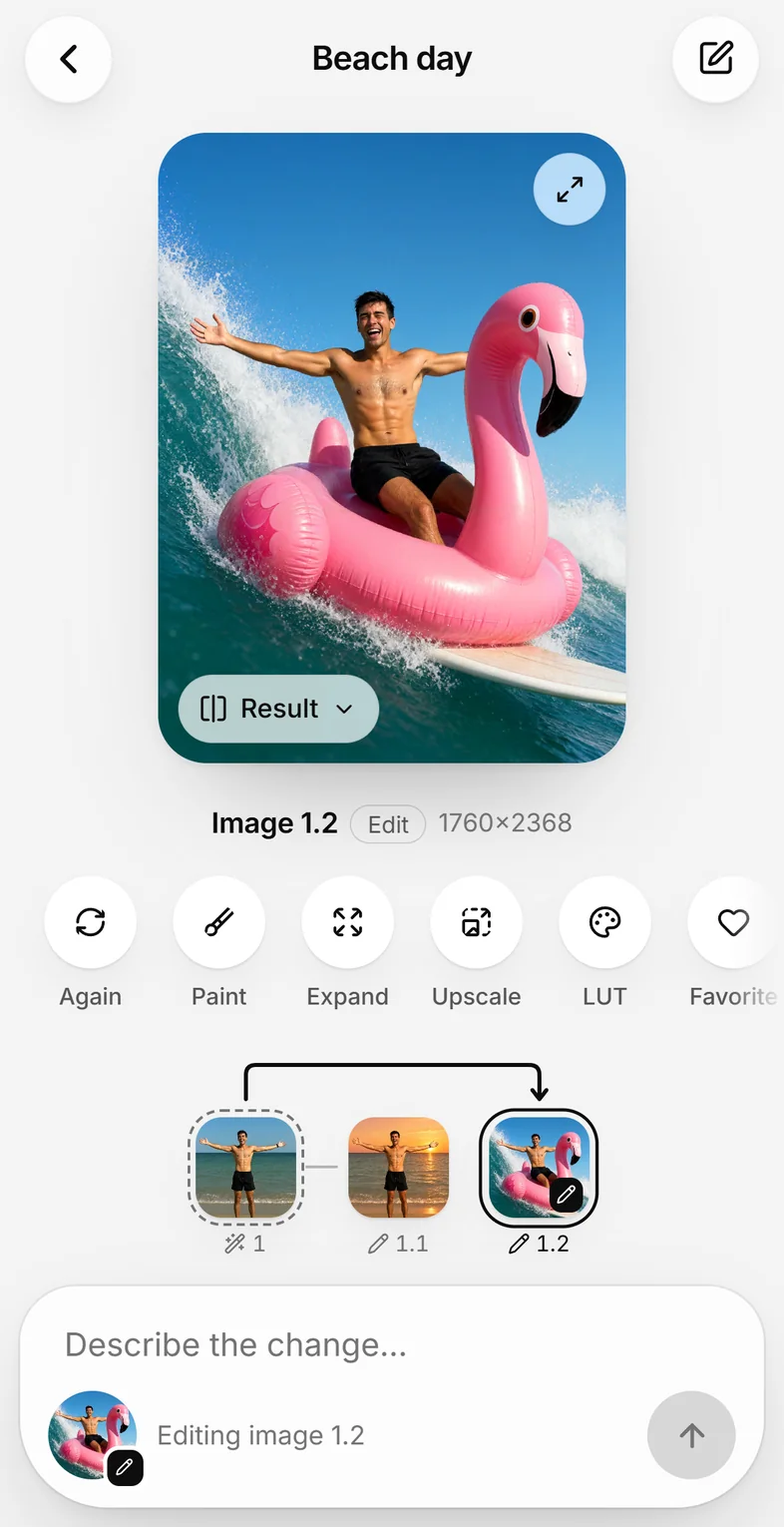
Settings → Other devices shows a QR code. Scan it, type the password once, and add Kokon to the home screen like an app. On the phone, Kokon opens on your projects; Edit a photo takes one from the phone's photos or camera.
Free and open source · runs on your own GPU · images for non-commercial use
New in 0.12 · Layers lab
Click the things you want. Each gets its own layer, with the background painted in behind.
New in 0.11 · Other devices
Open Kokon in a browser on your phone, tablet or laptop. The images are still made by the computer with the graphics card and saved in its gallery, and nothing goes through a cloud.
Your computerKokon and the graphics card do the work
A laptopany browser on the same network
Your phonescan the QR code, add it to the home screen
Settings → Other devices shows a QR code. Scan it, type the password once, and add Kokon to the home screen like an app. On the phone, Kokon opens on your projects; Edit a photo takes one from the phone's photos or camera.
Nothing listens on the network until you set a password, and 5 wrong tries make that device wait. Away from home, use Tailscale or another VPN, never an open port on the router.
No screen needed: kokon-service on Linux, or the Docker image for NVIDIA cards. Run docker compose up -d, set the password, open the address.
Runs on
Examples
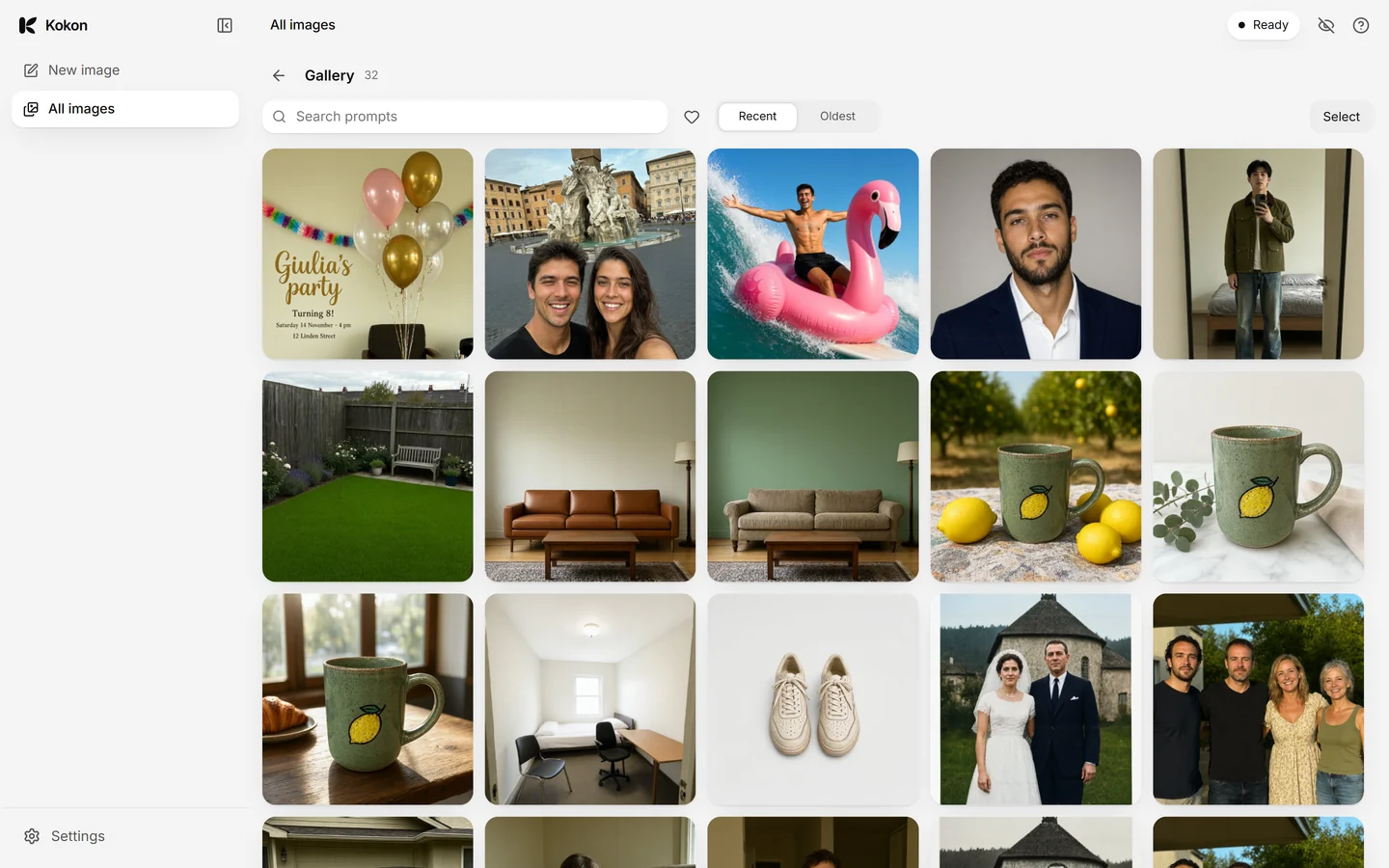
Drag the slider. Every image on this page was made by Kokon on a single RTX 5070 Ti, first try.
Times on an RTX 5070 Ti: about 36 s for a new image at native 2K, about 24 s for an edit at 1.5K. The prompts and seeds are in the repository.
From the people using it
Comments from Reddit and GitHub, word for word. Click a name to read the whole comment.
"Install really is as easy as you say, and the quality (so far) is as good as anything I've come across."
"So much better than having up 5 or 10+ workflows to sort through. The ease of use and intuitive design."
"I'm running it on a 7900 XTX under Windows, and the experience have been really good! No problems so far with vulkan."
"8GB VRAM here. It works and it's so much faster than the image editor in unsloth desktop"
"I've been tinkering with image models in ComfyUI a lot this year and I really like the clean interface you've made. Kokon is just really nice to boot up and use."
"Thank you for Kokon, it is beautifully designed and very useful."
Features
No nodes, no samplers, no VRAM math. Write what you want; Kokon handles the rest.
Brush over a part of the photo, then choose Change, Remove, Replace or Add. The model sees exactly where you painted, and every pixel outside the brush stays as it was.


Kokon ships the best open model we've tested and tunes size, memory and upscaling for your GPU. Pick Fast, Balanced or Quality. That's it.
Each edit becomes a new version. Compare before and after, undo, or branch from any step.

Your photos and prompts never leave your computer. Turn on private mode and nothing is kept at all: no gallery, no files, no history.
A native app, about 140 to 170 MB. The models download and are checked on first run, with resume.
A built-in MCP server and a local HTTP API let Claude Code, Cursor or any MCP client create and edit images on your machine, for free and offline.
generate_imageedit_imageinpaint_imageoutpaint_imageupscale_imageType a few words, in any language. Prompt+ turns them into a detailed prompt, looking at your photo for edits, then makes the image. It uses Qwen3-VL, which Qwen-Image 2.1 already loads: no second model to download.
sunny italian street, café, red scooterA 35mm photograph of a sunny cobblestone street in a small Italian coastal town…Load a Qwen-Image 2.1 LoRA once in Settings, then turn it on or off for each project with one click. Kokon keeps its own prepared copy; your file is never changed. Tested on Windows so far.
How it works
No Python environment, no ComfyUI workflows, no model files to hunt down. Read the full guide.
A native app for Windows 10/11 (about 136 MB), macOS on Apple Silicon (about 162 MB) or Linux (.deb and .rpm, about 170 MB). On Windows it installs for your user, no admin rights needed.
Kokon detects your GPU (NVIDIA, AMD, Intel or Apple Silicon), picks the right preset and downloads Qwen-Image 2.1 Turbo, with resume and SHA-256 checks.
Drop a photo, write what you want and press Enter. Or paint an area first, and only that area changes.
Compare
Cloud editors are simple but upload your photos and limit how much you use them. Node-based tools run locally but you build everything yourself. Kokon is simple and local: we make the technical choices, you make the edits.
| Kokon | ChatGPT, Gemini (Nano Banana) | Photoshop Generative Fill | Node-based tools e.g. ComfyUI | |
|---|---|---|---|---|
| Your photos stay on your computer | Yes | No, they are uploaded | No, generated in Adobe's cloud | Yes |
| Cost and limits | Free, no limits: it's your GPU | Daily limits, or a subscription | Subscription and generative credits | Free |
| Works offline | Yes, after setup | No | No | Yes |
| Setup | One installer, the model downloads itself | An account | Creative Cloud | Python, custom nodes, model files, workflows |
| Who picks the model and settings | Kokon: a tested model, tuned for your GPU | The service | Adobe | You |
| Edit with one sentence | Yes | Yes | A short prompt for a selection | After building a workflow |
| Paint an area, change only that | Built in | Partly | Yes | With an inpainting workflow |
| Local MCP server for AI agents | Built in, no API key | Paid API | No | Third-party |
Fair to say: cloud models run on data-center GPUs, so they can be faster and stronger on some edits. Kokon uses Qwen-Image 2.1, which leads the open-weights image-editing rankings, and runs it on the computer you already have.
AI agents
Register Kokon once. Then ask for a hero image, a cleaned-up screenshot or a product shot, and your agent makes it on your GPU. The app doesn't even need to be open.
claude mcp add --scope user kokon -- "$env:LOCALAPPDATA\Kokon\kokon-mcp.exe"Windows command shown. Mac and other hosts: MCP setup guide.

Requirements
Privacy
Creating, editing, the gallery, the MCP server and the API all talk to 127.0.0.1 only. Kokon goes online for two things, and you can check it yourself.
The engine from github.com and the models from huggingface.co, checked against pinned SHA-256 hashes.
At most once a day, a small file with the newest version number. Nothing about you is sent, and you can turn it off.
One click and nothing is saved: no gallery, no files, no project history.
FAQ
Yes. Kokon is open source under the GNU AGPL-3.0 license. No account, no credits, no subscription, no daily limit. It uses your own GPU, so there is nothing to pay for. The images are for non-commercial use, because of the model's license (see below).
For editing photos with a sentence, yes: "remove the people", "make it a snowy night", "change the sign to say…". The difference is where it runs. Kokon runs on your own GPU, so your photos are never uploaded and there are no limits or subscriptions. Cloud models run on data-center GPUs and can be faster or stronger on some edits; Kokon uses Qwen-Image 2.1, which leads the open-weights image-editing rankings. More in Kokon vs Nano Banana.
Kokon makes that choice for you, on purpose. We test the open image models and ship the best one as the default, tuned for your graphics card, so you never have to compare checkpoints, samplers or settings. Today that is Qwen-Image 2.1 Turbo. When a better open model comes out and wins our tests, an update brings it. If you already have the same model files on disk (for example from ComfyUI), setup can use them instead of downloading them again, and you can add your own LoRAs.
Install Kokon and let its setup download the model. Kokon runs Qwen-Image 2.1 through stable-diffusion.cpp, a native engine, so there is no Python, no ComfyUI and no workflow to build. The step-by-step guide is at kokon.app/qwen-image-2-1-local.
Qwen-Image 2.1 Turbo, the official 8-step version of Qwen's image model, which both creates and edits images and leads the open-weights image-editing rankings.
Yes, in beta, through the Vulkan engine on Windows with 12 GB of VRAM or more. On NVIDIA it uses CUDA; on Apple Silicon Macs it uses Metal.
Yes, in beta. Kokon makes images at about 1 megapixel on 8 GB cards; users report it works on an RTX 3060 Ti and an RTX 5050 Laptop (1 to 2 minutes per edit). 16 GB of system RAM is recommended. On a Mac, 16 GB of unified memory works but slowly; 32 GB is recommended.
Yes. Kokon ships an MCP server: register it once and any MCP client can create, edit, inpaint, expand and upscale images on your GPU, for free and without an API key.
Yes, since 0.12, in the Layers lab (experimental). Click each thing you want on its own layer; Kokon cuts it out and paints the background behind it, so moving it leaves no hole. Then move, resize, hide or edit each layer, and save one image or a layered PSD for Photoshop, GIMP or Photopea. Text in the picture becomes an image layer, not editable type. More in split an image into layers.
For many edits, yes: paint an area and describe what should be there, or remove, replace and add objects. It runs offline and costs nothing. Since 0.12 it can also split an image into layers and export a PSD, but it is an AI editor, not a full layer-based editor like Photoshop.
Not with the default model. The app is open source (AGPL-3.0), but Qwen-Image 2.1 is released under the Qwen Research License: research and evaluation only, no commercial use without a license from the Qwen team. The default upscaler (Superscale-SP) allows commercial use; the optional UltraSharp upscaler is non-commercial (CC BY-NC-SA 4.0).
The beta installer is not code-signed yet, so SmartScreen warns about it. Click "More info" and then "Run anyway". The code is public and every download the app makes is checked against a pinned hash.
The beta is not notarized by Apple yet, so macOS blocks it the first time:
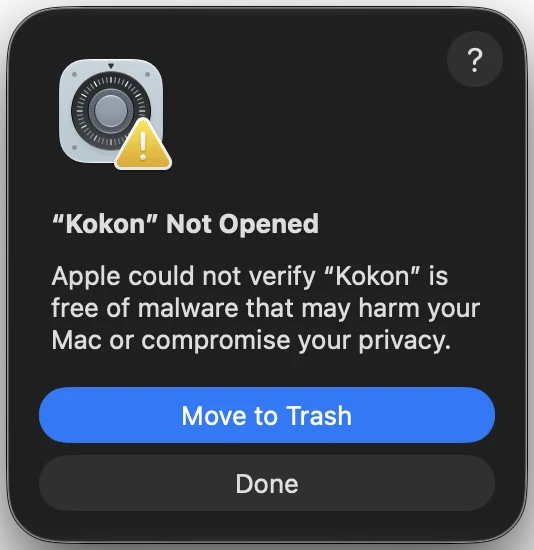
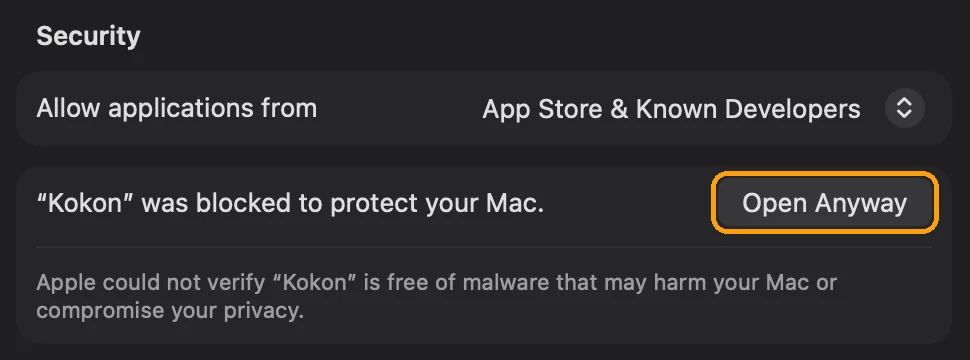
If macOS instead only says The application “Kokon” can't be opened, with just an OK button, and Privacy & Security shows no Open Anyway: open Terminal, run xattr -dr com.apple.quarantine /Applications/Kokon.app, then open Kokon as usual. This removes the “downloaded from the internet” flag from Kokon only.
Describe the scene, not just the subject: who, doing what, where, in what light. Never write “no X” (it adds X), put text in quotes, and for edits name the exact thing to change. The prompt guide shows each rule with a vague and a clear prompt side by side.
Yes, in beta, on x86-64: a .deb for Ubuntu, Debian and Mint and an .rpm for Fedora, from the latest release. Install it with sudo apt install ./Kokon_<version>_amd64.deb or sudo dnf install ./Kokon-<version>-1.x86_64.rpm. NVIDIA cards need the proprietary driver; AMD and Intel cards use Vulkan. Since 0.11 it also runs as a headless server, with the interface in your browser, and as a Docker image for NVIDIA cards.
An optional helper next to the prompt box. Write a short idea in any language and Prompt+ writes a detailed English prompt from it (looking at your photo for edits), then makes the image; the result keeps both prompts. It runs on Qwen3-VL, the text encoder Qwen-Image 2.1 already loads, inside Kokon's own build of stable-diffusion.cpp, so there is no second model to download. It adds about 2 seconds per image on an RTX 5070 Ti.
Yes, in beta: your own LoRA files made for Qwen-Image 2.1 (.safetensors). Load them in Settings → LoRA and turn them on for each project with the LoRA button next to the prompt, up to 3 at a time. LoRAs for older Qwen-Image versions don't work with 2.1. Tested on Windows so far; there is no LoRA catalog yet, because the popular LoRAs we tested didn't improve on what Turbo does with a good prompt.
Yes. After setup has downloaded the models, everything runs offline.
Yes, since 0.11. On the computer with the graphics card, open Settings → Other devices, set a password and scan the QR code with your phone. The phone uses Kokon in its browser (or from an icon on the home screen); the computer makes the images and keeps them in its gallery. Away from home, use Tailscale or another VPN. Step by step: use Kokon from your phone, or run it as a server.
Free, open source, and yours to run.
 Made by Gabriele LozuponeAI researcher. Built Kokon with the help of Claude Code. More about me →